Google Fi Unlimited Review: Pros, Cons, and Key Features
If you’re looking for a mobile plan that offers flexibility, affordability, and excellent coverage, Google Fi Unlimited might be the perfect solution for you.
In this article, we’ll explore the key aspects that make this service highly sought after by frequent travelers, heavy data users, and families.
Below, you’ll find a comprehensive overview of the main topics that set Google Fi Unlimited apart from other available plans on the market.
International Coverage
One of the biggest attractions of Google Fi Unlimited is its extensive international coverage.
If you frequently travel for business or leisure, this plan offers a hassle-free solution to stay connected in more than 200 countries and territories without the need to switch SIM cards or pay exorbitant roaming fees.
Step-by-Step Guide to Using Google Fi Internationally
- Check compatibility: Before traveling, make sure your device is compatible with Google Fi.
- Activate international service: In your Google Fi app, go to settings and enable international data usage.
- Arrive at your destination: Once you land in a new country, your phone will automatically connect to the local network without needing to swap SIM cards.
- Monitor data usage: Keep an eye on your data usage through the Google Fi app to avoid speed reduction after exceeding the data limit.
Additionally, the Unlimited Plus plan offers free calls to over 50 countries from the United States, which is a significant advantage for those who frequently make international calls.
High-Speed Data Limit
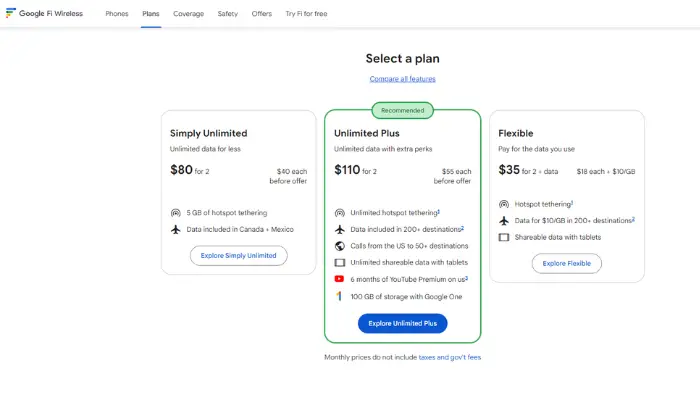
While Google Fi Unlimited offers unlimited data, it’s essential to understand that there is a limit to high-speed data usage.
The Unlimited Plus plan provides 50GB of high-speed data per billing cycle, while the Simply Unlimited plan offers 35GB.
After reaching this limit, your connection speed will be reduced to 256 kbps, which is sufficient for basic tasks like messaging but inadequate for streaming videos or large downloads.
Tips for Managing Data Usage
- Use Wi-Fi whenever possible: Especially at home or in cafes, to preserve mobile data.
- Set data alerts: In the Google Fi app, you can set alerts to notify you when you’re nearing your high-speed data limit.
- Avoid streaming in high resolution: Adjusting video quality to 480p or 720p can save significant amounts of data over the month.
Mobile Hotspot Usage
If you need to share your internet connection with other devices, the Google Fi Unlimited Plus plan allows for unlimited mobile hotspot usage without additional costs.
For Simply Unlimited users, there is a 5GB hotspot data limit, which may be sufficient for occasional use but not for intensive activities like long video calls.
How to Set Up a Hotspot on Google Fi
- On your device, go to the network settings.
- Select the “Mobile Hotspot” option and turn it on.
- Set up the hotspot name and password for security.
- Connect your other devices to the Wi-Fi network generated by your phone.
This feature is especially useful for those who work remotely or need internet access in areas where Wi-Fi is not readily available
Cloud Storage
Another benefit of the Unlimited Plus plan is the inclusion of free cloud storage. With 100GB on Google One, you can securely store photos, videos, documents, and other important files.
For those already using Google services like Google Drive or Google Photos, this is a significant advantage, as it allows seamless integration of all your data in one ecosystem.
How to Use Google One on the Unlimited Plus Plan
- Access Google One: Once your plan is activated, you can access Google One directly from the Google Fi app.
- Automatic backup: Enable automatic backup of photos, videos, and important documents to avoid losing your data in case of a malfunction or theft.
- Manage your storage: Google One also allows you to monitor your storage usage and purchase more space if needed.
Coverage in Rural and Urban Areas
Google Fi stands out for offering robust coverage in both urban and remote areas. It uses the networks of T-Mobile and US Cellular, and it also automatically connects to secure Wi-Fi networks to ensure continuous connectivity.
In rural areas, coverage may be more limited, but in urban and suburban regions, the connection is generally fast and reliable.
Improving Coverage in Rural Areas
- Enable Wi-Fi calling: When in areas with weak network coverage, enable the Wi-Fi calling feature to maintain communication.
- Use a signal booster: If you live in a rural area with limited coverage, consider using a signal booster to improve reception.
Data Speed After Reaching the Limit
As mentioned earlier, after using your 50GB of high-speed data (or 35GB on Simply Unlimited), your connection will slow to 256 kbps.
While this speed is enough for basic tasks like sending messages and checking emails, activities like video streaming, large downloads, or video calls might be affected.
What to Do When Your Connection Slows Down
- Switch to Wi-Fi: Whenever possible, connect to a Wi-Fi network to continue your activities without interruptions.
- Adjust data usage: Avoid downloading large files or watching high-resolution videos during the reduced speed period.
Cost-Effectiveness for Families and Groups
One of the greatest advantages of Google Fi Unlimited is its cost-effectiveness, especially for families and groups. The Unlimited Plus plan offers decreasing prices as more lines are added.
For example, a single line costs about $65 per month, but with four lines, the price drops to $40 per line. This makes Google Fi an affordable choice for families looking for unlimited and international connectivity.
How to Set Up Multiple Lines on Google Fi
- Access the app: In the Google Fi app, go to the “Manage Lines” section.
- Add new lines: Click “Add Line” and follow the instructions to set up the new lines.
- Distribute data usage: Each user can monitor their data usage and adjust as necessary.
This flexibility makes Google Fi one of the best mobile plans for families and groups, ensuring high-quality connectivity at an affordable price.
In conclusion, Google Fi Unlimited is an excellent choice for those seeking flexibility, international coverage, and great additional benefits such as hotspot usage and cloud storage.
Whether you’re a frequent traveler, a professional who needs constant connectivity, or a family looking for an affordable plan, Google Fi may be the ideal solution for your mobile connectivity needs.